> ## Documentation Index
> Fetch the complete documentation index at: https://daily-docs-deploy-no-op-warm-pods-t3002.mintlify.site/llms.txt
> Use this file to discover all available pages before exploring further.
# Pipecat Cloud Session API
> Send HTTP requests directly to running Pipecat Cloud agent sessions through the session API proxy for custom control.
The Session API lets you send HTTP requests directly to your running Pipecat Cloud agents. This enables real-time control and data exchange with active sessions, such as updating conversation context, triggering actions, or retrieving session state.
## How It Works
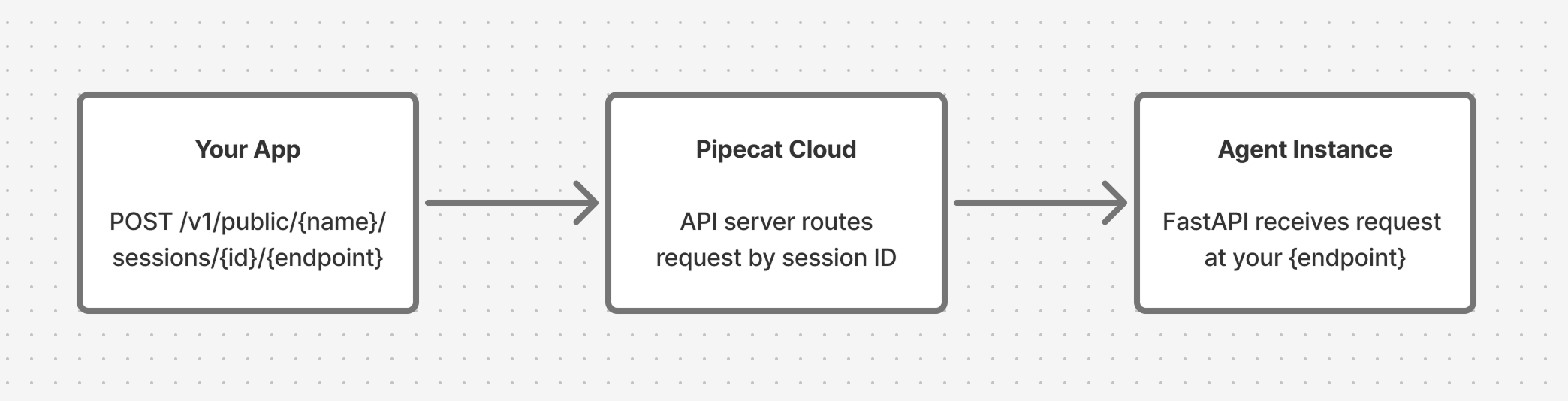
Your bot runs inside a [FastAPI](https://fastapi.tiangolo.com/) server managed by the Pipecat Cloud base image. When you define custom endpoints using the `app` object from `pipecatcloud_system`, they become reachable through the Session API.
Requests are proxied through Pipecat Cloud to the specific bot instance handling your session:
 To use the Session API:
[Start a session](/pipecat-cloud/fundamentals/active-sessions) with your
agent and capture the `sessionId` from the response.
Add custom routes to the `app` object from `pipecatcloud_system` in your
`bot.py`.
Make HTTP requests to the session endpoint. Pipecat Cloud routes them to the
bot instance for that session.
## Endpoint Format
```
https://api.pipecat.daily.co/v1/public/{service_name}/sessions/{session_id}/{path}
```
| Parameter | Description |
| -------------- | --------------------------------------------- |
| `service_name` | The name of your deployed agent |
| `session_id` | The `sessionId` value from the start response |
| `path` | The endpoint path you defined in your bot |
### Supported Methods
`GET`, `POST`, `PUT`, `PATCH`, `DELETE`, `OPTIONS`, `HEAD`
## Authentication
Include your Pipecat Cloud public API key in the `Authorization` header:
```bash theme={null}
Authorization: Bearer pk_...
```
## Setting Up Your Bot
Define endpoints in your `bot.py` using the `app` object from `pipecatcloud_system`. This is the same FastAPI application that serves your bot, so your custom routes run alongside the built-in ones.
```python theme={null}
from pipecatcloud_system import app
@app.get("/status")
async def get_status():
return {"status": "active"}
@app.post("/context")
async def update_context(data: dict):
return {"updated": True}
```
Requires base image version `0.1.2` or later.
### Connecting Endpoints to Your Pipeline
Most Session API use cases require your endpoint to interact with the running pipeline. The pattern is:
1. Store a reference to your [`PipelineWorker`](/api-reference/server/pipeline/pipeline-worker) in a module-level variable
2. Access it from your endpoint handler to [queue frames](/api-reference/server/pipeline/pipeline-worker#frame-management) into the pipeline
```python theme={null}
from pipecatcloud_system import app
from pipecat.pipeline.worker import PipelineWorker
# Module-level reference to the running pipeline worker
pipeline_worker: PipelineWorker | None = None
async def bot(args):
global pipeline_worker
# ... set up your pipeline ...
pipeline_worker = worker
runner = WorkerRunner()
await runner.run(worker)
pipeline_worker = None
@app.post("/context")
async def update_context(data: dict):
if not pipeline_worker:
return {"error": "No active pipeline"}, 503
# Use pipeline_worker.queue_frame() to inject frames
# ...
```
Since Pipecat Cloud runs one session per pod, a single module-level variable
works well. You don't need to key by session ID.
## Examples
### Update Conversation Context
Use [`LLMMessagesAppendFrame`](/api-reference/server/pipeline/pipeline-worker#frame-management) to add messages to the LLM's conversation context from an HTTP request. Setting `run_llm=True` tells the pipeline to immediately send the updated context to the LLM for a response.
```python theme={null}
from pipecatcloud_system import app
from pydantic import BaseModel
from pipecat.pipeline.worker import PipelineWorker
from pipecat.workers.runner import WorkerRunner
from pipecat.frames.frames import LLMMessagesAppendFrame
pipeline_worker: PipelineWorker | None = None
class ContextUpdate(BaseModel):
user_name: str
preferences: dict
@app.post("/context")
async def update_context(update: ContextUpdate):
if not pipeline_worker:
return {"error": "No active pipeline"}, 503
# Inject a developer message into the conversation
await pipeline_worker.queue_frame(
LLMMessagesAppendFrame(
messages=[{
"role": "developer",
"content": (
f"The user's name is {update.user_name}. "
f"Their preferences: {update.preferences}"
),
}],
run_llm=False, # Don't trigger a response yet
)
)
return {"status": "context updated", "user_name": update.user_name}
async def bot(args):
global pipeline_worker
# ... set up your pipeline ...
pipeline_worker = worker
runner = WorkerRunner()
await runner.run(worker)
pipeline_worker = None
```
Call the endpoint:
```bash theme={null}
curl -X POST \
'https://api.pipecat.daily.co/v1/public/my-agent/sessions/{session_id}/context' \
-H 'Authorization: Bearer pk_...' \
-H 'Content-Type: application/json' \
-d '{"user_name": "Alice", "preferences": {"language": "Spanish"}}'
```
### Trigger the Bot to Speak
Use [`TTSSpeakFrame`](/api-reference/server/pipeline/pipeline-worker#frame-management) to make the bot say something on demand:
```python theme={null}
from pipecatcloud_system import app
from pydantic import BaseModel
from pipecat.pipeline.worker import PipelineWorker
from pipecat.workers.runner import WorkerRunner
from pipecat.frames.frames import TTSSpeakFrame
pipeline_worker: PipelineWorker | None = None
class SpeakRequest(BaseModel):
message: str
@app.post("/speak")
async def trigger_speech(req: SpeakRequest):
if not pipeline_worker:
return {"error": "No active pipeline"}, 503
await pipeline_worker.queue_frame(TTSSpeakFrame(text=req.message))
return {"queued": True, "message": req.message}
async def bot(args):
global pipeline_worker
# ... set up your pipeline ...
pipeline_worker = worker
runner = WorkerRunner()
await runner.run(worker)
pipeline_worker = None
```
Call the endpoint:
```bash theme={null}
curl -X POST \
'https://api.pipecat.daily.co/v1/public/my-agent/sessions/{session_id}/speak' \
-H 'Authorization: Bearer pk_...' \
-H 'Content-Type: application/json' \
-d '{"message": "Hello Alice, welcome back!"}'
```
### Get Session Status
Endpoints don't have to interact with the pipeline. You can also use them to expose any state your bot tracks:
```python theme={null}
from pipecatcloud_system import app
session_data = {"messages": [], "user_name": None}
@app.get("/status")
async def get_status():
return {
"message_count": len(session_data["messages"]),
"user_name": session_data["user_name"],
}
```
```bash theme={null}
curl -X GET \
'https://api.pipecat.daily.co/v1/public/my-agent/sessions/{session_id}/status' \
-H 'Authorization: Bearer pk_...'
```
## Important Notes
* **Startup latency**: If you call the Session API before your bot finishes initializing, the request may take longer while waiting for the bot to become available.
* **Session scope**: Each request is routed to the specific bot instance identified by `session_id`. Different sessions are separate pods and don't share state.
* **Error handling**: If a session has ended or the session ID is invalid, you'll receive an error response.
* **Reserved paths**: The base image uses `/bot`, `/ws`, `/api/offer`, `/whatsapp`, `/readyz`, and `/livez`. Don't define endpoints at these paths.
## Getting Help
If you have questions about the Session API, reach out on [Discord](https://discord.gg/pipecat).
To use the Session API:
[Start a session](/pipecat-cloud/fundamentals/active-sessions) with your
agent and capture the `sessionId` from the response.
Add custom routes to the `app` object from `pipecatcloud_system` in your
`bot.py`.
Make HTTP requests to the session endpoint. Pipecat Cloud routes them to the
bot instance for that session.
## Endpoint Format
```
https://api.pipecat.daily.co/v1/public/{service_name}/sessions/{session_id}/{path}
```
| Parameter | Description |
| -------------- | --------------------------------------------- |
| `service_name` | The name of your deployed agent |
| `session_id` | The `sessionId` value from the start response |
| `path` | The endpoint path you defined in your bot |
### Supported Methods
`GET`, `POST`, `PUT`, `PATCH`, `DELETE`, `OPTIONS`, `HEAD`
## Authentication
Include your Pipecat Cloud public API key in the `Authorization` header:
```bash theme={null}
Authorization: Bearer pk_...
```
## Setting Up Your Bot
Define endpoints in your `bot.py` using the `app` object from `pipecatcloud_system`. This is the same FastAPI application that serves your bot, so your custom routes run alongside the built-in ones.
```python theme={null}
from pipecatcloud_system import app
@app.get("/status")
async def get_status():
return {"status": "active"}
@app.post("/context")
async def update_context(data: dict):
return {"updated": True}
```
Requires base image version `0.1.2` or later.
### Connecting Endpoints to Your Pipeline
Most Session API use cases require your endpoint to interact with the running pipeline. The pattern is:
1. Store a reference to your [`PipelineWorker`](/api-reference/server/pipeline/pipeline-worker) in a module-level variable
2. Access it from your endpoint handler to [queue frames](/api-reference/server/pipeline/pipeline-worker#frame-management) into the pipeline
```python theme={null}
from pipecatcloud_system import app
from pipecat.pipeline.worker import PipelineWorker
# Module-level reference to the running pipeline worker
pipeline_worker: PipelineWorker | None = None
async def bot(args):
global pipeline_worker
# ... set up your pipeline ...
pipeline_worker = worker
runner = WorkerRunner()
await runner.run(worker)
pipeline_worker = None
@app.post("/context")
async def update_context(data: dict):
if not pipeline_worker:
return {"error": "No active pipeline"}, 503
# Use pipeline_worker.queue_frame() to inject frames
# ...
```
Since Pipecat Cloud runs one session per pod, a single module-level variable
works well. You don't need to key by session ID.
## Examples
### Update Conversation Context
Use [`LLMMessagesAppendFrame`](/api-reference/server/pipeline/pipeline-worker#frame-management) to add messages to the LLM's conversation context from an HTTP request. Setting `run_llm=True` tells the pipeline to immediately send the updated context to the LLM for a response.
```python theme={null}
from pipecatcloud_system import app
from pydantic import BaseModel
from pipecat.pipeline.worker import PipelineWorker
from pipecat.workers.runner import WorkerRunner
from pipecat.frames.frames import LLMMessagesAppendFrame
pipeline_worker: PipelineWorker | None = None
class ContextUpdate(BaseModel):
user_name: str
preferences: dict
@app.post("/context")
async def update_context(update: ContextUpdate):
if not pipeline_worker:
return {"error": "No active pipeline"}, 503
# Inject a developer message into the conversation
await pipeline_worker.queue_frame(
LLMMessagesAppendFrame(
messages=[{
"role": "developer",
"content": (
f"The user's name is {update.user_name}. "
f"Their preferences: {update.preferences}"
),
}],
run_llm=False, # Don't trigger a response yet
)
)
return {"status": "context updated", "user_name": update.user_name}
async def bot(args):
global pipeline_worker
# ... set up your pipeline ...
pipeline_worker = worker
runner = WorkerRunner()
await runner.run(worker)
pipeline_worker = None
```
Call the endpoint:
```bash theme={null}
curl -X POST \
'https://api.pipecat.daily.co/v1/public/my-agent/sessions/{session_id}/context' \
-H 'Authorization: Bearer pk_...' \
-H 'Content-Type: application/json' \
-d '{"user_name": "Alice", "preferences": {"language": "Spanish"}}'
```
### Trigger the Bot to Speak
Use [`TTSSpeakFrame`](/api-reference/server/pipeline/pipeline-worker#frame-management) to make the bot say something on demand:
```python theme={null}
from pipecatcloud_system import app
from pydantic import BaseModel
from pipecat.pipeline.worker import PipelineWorker
from pipecat.workers.runner import WorkerRunner
from pipecat.frames.frames import TTSSpeakFrame
pipeline_worker: PipelineWorker | None = None
class SpeakRequest(BaseModel):
message: str
@app.post("/speak")
async def trigger_speech(req: SpeakRequest):
if not pipeline_worker:
return {"error": "No active pipeline"}, 503
await pipeline_worker.queue_frame(TTSSpeakFrame(text=req.message))
return {"queued": True, "message": req.message}
async def bot(args):
global pipeline_worker
# ... set up your pipeline ...
pipeline_worker = worker
runner = WorkerRunner()
await runner.run(worker)
pipeline_worker = None
```
Call the endpoint:
```bash theme={null}
curl -X POST \
'https://api.pipecat.daily.co/v1/public/my-agent/sessions/{session_id}/speak' \
-H 'Authorization: Bearer pk_...' \
-H 'Content-Type: application/json' \
-d '{"message": "Hello Alice, welcome back!"}'
```
### Get Session Status
Endpoints don't have to interact with the pipeline. You can also use them to expose any state your bot tracks:
```python theme={null}
from pipecatcloud_system import app
session_data = {"messages": [], "user_name": None}
@app.get("/status")
async def get_status():
return {
"message_count": len(session_data["messages"]),
"user_name": session_data["user_name"],
}
```
```bash theme={null}
curl -X GET \
'https://api.pipecat.daily.co/v1/public/my-agent/sessions/{session_id}/status' \
-H 'Authorization: Bearer pk_...'
```
## Important Notes
* **Startup latency**: If you call the Session API before your bot finishes initializing, the request may take longer while waiting for the bot to become available.
* **Session scope**: Each request is routed to the specific bot instance identified by `session_id`. Different sessions are separate pods and don't share state.
* **Error handling**: If a session has ended or the session ID is invalid, you'll receive an error response.
* **Reserved paths**: The base image uses `/bot`, `/ws`, `/api/offer`, `/whatsapp`, `/readyz`, and `/livez`. Don't define endpoints at these paths.
## Getting Help
If you have questions about the Session API, reach out on [Discord](https://discord.gg/pipecat).