> ## Documentation Index
> Fetch the complete documentation index at: https://daily-docs-deploy-no-op-warm-pods-t3002.mintlify.site/llms.txt
> Use this file to discover all available pages before exploring further.
# Pipecat Cloud
> Pipecat Cloud is the managed hosting platform for deploying and scaling Pipecat agents, from the team behind the framework.
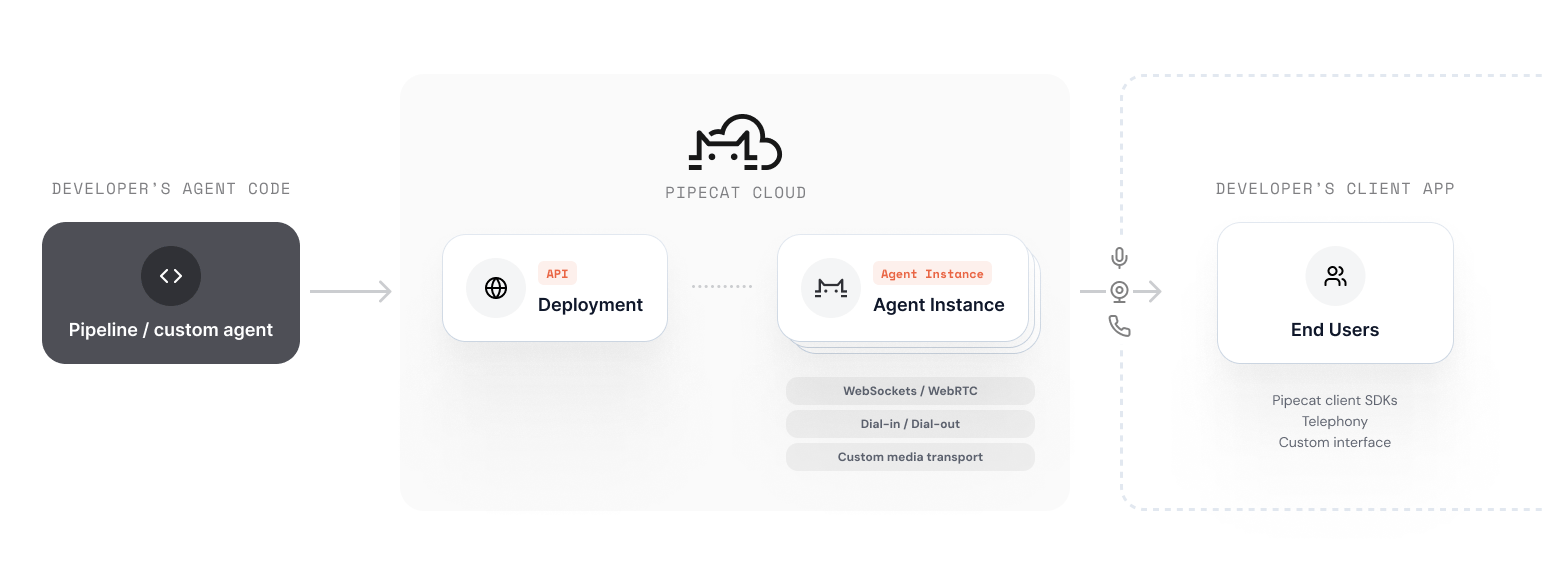
[Pipecat Cloud](https://pipecat.daily.co) is a managed platform for deploying and scaling Pipecat agents in production. It handles infrastructure, scaling, and operations so you can focus on building your agent.
 ## Key Capabilities
* **One-command deploy**: Package and deploy agents with `pipecat cloud deploy`
* **Auto-scaling**: Scale from zero to thousands of concurrent sessions
* **Built-in WebRTC**: Daily WebRTC transport included, no separate infrastructure needed
* **Secrets management**: Securely store and inject API keys and credentials
* **Session management**: Start, stop, and monitor agent sessions via REST API or SDK
* **Logging & monitoring**: Built-in logging with Datadog integration support
* **Global regions**: Deploy close to your users for lowest latency
## How It Works
Write a Pipecat pipeline as you normally would, using any supported services.
Use the CLI to build and deploy your agent image to Pipecat Cloud.
```bash theme={null}
pipecat cloud deploy
```
Use the REST API or Python SDK to start agent sessions on demand.
```bash theme={null}
curl --request POST \
--url https://api.pipecat.daily.co/v1/public/{agentName}/start \
--header 'Authorization: Bearer ' \
--header 'Content-Type: application/json' \
```
## Next Steps
Set up your account and deploy your first agent.
Learn about accounts, agent images, secrets, and scaling.
## Key Capabilities
* **One-command deploy**: Package and deploy agents with `pipecat cloud deploy`
* **Auto-scaling**: Scale from zero to thousands of concurrent sessions
* **Built-in WebRTC**: Daily WebRTC transport included, no separate infrastructure needed
* **Secrets management**: Securely store and inject API keys and credentials
* **Session management**: Start, stop, and monitor agent sessions via REST API or SDK
* **Logging & monitoring**: Built-in logging with Datadog integration support
* **Global regions**: Deploy close to your users for lowest latency
## How It Works
Write a Pipecat pipeline as you normally would, using any supported services.
Use the CLI to build and deploy your agent image to Pipecat Cloud.
```bash theme={null}
pipecat cloud deploy
```
Use the REST API or Python SDK to start agent sessions on demand.
```bash theme={null}
curl --request POST \
--url https://api.pipecat.daily.co/v1/public/{agentName}/start \
--header 'Authorization: Bearer ' \
--header 'Content-Type: application/json' \
```
## Next Steps
Set up your account and deploy your first agent.
Learn about accounts, agent images, secrets, and scaling.